
The Bucket Slider is a specialized version of the numerical slider that groups products into predefined ranges, or "buckets." This is particularly useful for creating a histogram-style UI where users can see the distribution of products across the numerical scale (e.g., price distribution).
Unlike a standard slider, which allows selecting any value between a min and max, a Bucket Slider works with discrete steps defined by the backend.
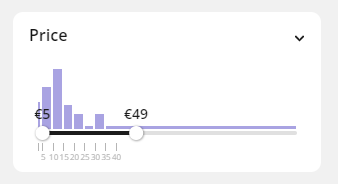
To understand slider basics, make sure you read our slider guide.
Implementation
1. Configuration in Tweakwise App
To enable a slider for an attribute:
- Go to the filtertemplate you want to contain the slider.
- Select or add the attribute (e.g., "Price").
- Set the Selection type to Bucket Slider.
- Enable Use Clickpoints to provide predefined jumping points on the slider scale.
- Enable Use Buckets to provide predefined buckets on the histogram.
- Ensure the attribute is imported as a numerical value (Integer or Decimal).
2. Handling the API Response
When selectiontype is set to slider andcontainsbuckets is true, the API returns an array of buckets. Each entry contains the boundaries and the relative density of products in that range. These can be used to create a histogram.
{
  "facets": [
    {
      "title": "Price",
      "urlid": "price",
      "selectiontype": "slider",
      "containsbuckets": true,
      "containsclickpoints": true,
      "buckets": [
        { "rangemin": 0, "rangemax": 50, "relativeamount": 100 },
        { "rangemin": 50, "rangemax": 100, "relativeamount": 45 }
      ],
      "clickpoints": [
        { "title": "50", "value": 50 },
        { "title": "150", "value": 150 }
      ],
      "attributes": [
        { "title": "0", "isselected": false },
        { "title": "200", "isselected": false }
      ]
    }
  ]
}
To render the visual bars, map the buckets array to a series of relative-width div elements positioned above your slider track.
- Height: Use relativeamount to set the height of each bar. It is recommended to normalize these values against the highest relativeamount in the set.
- Width & Position: Calculate the left position and width of each bar as a percentage of the total range (max - min).
- Active State: Compare the bucket's rangemin and rangemax against the current selected values. If the bucket falls within the selection, apply an active CSS class.
const delta = max - min;
const left = (100 * (bucket.rangemin - min)) / delta;
const width = (100 * (bucket.rangemax - bucket.rangemin)) / delta;
const height = bucket.relativeamount; // Already normalized by Tweakwise
Advanced: Combining Buckets & Clickpoints
If clickpoints are configured and containsclickpoints is true, the API returns an array of clickpoints. You can combine histograms with clickpoints (often implemented as "Pips" in libraries like noUiSlider) to create a highly interactive experience.
- Pips as Shortcuts: Use the clickpoints array to render labels and markers on the slider track.
- Selection Logic: When a user clicks a clickpoint, update the slider handle closest to that value.
- Bucket Interaction: Allow users to click a histogram bar directly. You can trigger a slider update by setting the range to the bucket's rangemin and rangemax.
Notes & important considerations
- Empty Buckets: If a specific range has zero products, the API might omit that bucket or return it with a count of 0. Ensure your frontend can handle "gaps" in the histogram.
- Filtering: Even though the UI shows buckets, the filter logic remains range-based. You still send the filter as
tn_filters=price=20-140(ortn_fk_price=20-140), and Tweakwise will return products within that exact range, regardless of the bucket boundaries. - Dynamic Updates: When a user applies other filters, the bucket counts should update dynamically to reflect the new result set.
- Precision: Ensure your frontend rounding logic matches your bucket boundaries. If your bucket is 0-50 and the user slides to 49, the bucket may visually appear "inactive" depending on your CSS logic.
- Mobile Touch: Histograms can be difficult to interact with on mobile. Ensure the bars have a sufficient touch target or rely primarily on the slider handles for range selection.
FAQ
Q: Can I have non-linear bucket sizes (e.g., 0-10, 10-100, 100-1000)?
A: Standard Tweakwise bucket sliders use a fixed interval. If you need non-linear ranges, you should implement the attribute as a standard Checkbox or List facet using manually defined ranges in your data source.
Q: Can I change the bucket size dynamically?
A: No, the bucket size is fixed in the Tweakwise App configuration. To change it, you must update the facet settings and publish.
Q: Why is relativeamount used instead of count?
A: relativeamount is pre-normalized by the Tweakwise engine (usually 0-100), making it easier to use directly for CSS heights without needing to calculate the maximum count manually in the frontend.