
How to - Add to favorites / wishlist
In Tweakwise JS, an add-to-favorites button can be added to the product tile. This button will not automagically add the product to the wishlist: Tweakwise JS will trigger an event which can be used to implement this behavior.
Plugin Studio
Add a Button element to your tile, for example put a heart emoji as text or use an SVG as icon:
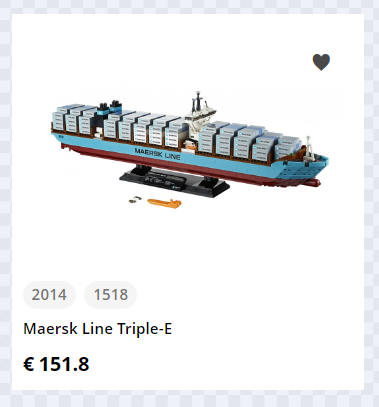
Next, configure the Add to favorites event on the element, using the Click event panel:
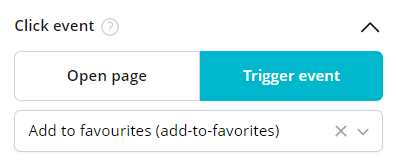
A click/tap on this button will result in the twn.add-to-favorites event in the event hooks.
Notes:
- If you want to use an SVG icon, convert the svg to base64 and use it in the stylesheet.
State
Part of properly implementing a favorites button is keeping track of what your users liked. In the previous code snippet you have hooked up your service to add a product to the wishlist for a particular user and now it is time to reflect this state in the appearance of the button every time a lister page is loaded.
Follow these steps to show the correct state on a product tile:
- Get the active wishlist contents
- Find the corresponding product tile (if available)
- Add an active state to the product, e.g. add a
is-favoriteclass - In Studio, make sure the tile adapts to the active state, for example show/hide respective icons corresponding to the state.
Function to set the state of products on the wishlist
function tw__applyWishlist(products){
  // fetch product IDs added to the wishlist.
  // either inject serverside or clientside.
  var addedProducts = ...
  for (var product of products) {
    // Check if added to a wishlist
    if (!addedProducts.includes(product.itemno)) return;
    var element = document.querySelector('[data-item-id="' + product.itemno + '"]');
    if (!element) return;
     element.classList.add('is-favorite');
  }
}
Set state on loading
Search and merchandising
const listerPage = tweakwiseListerPage({
  // ... other options ...
  on: {
    // ... other eventhandlers ...
    "twn.request.success": function (event) {
      // apply to search results
      tw__applyWishlist(event.data.groups || event.data.items);
    },
    "twn.request.navigation.success": function (event) {
		// apply to merchandising results
      tw__applyWishlist(event.data.groups || event.data.items);
    }
  }
});
<script>
window["twn-starter-config"] = {
// ... other options ...
on: {
// ... other eventhandlers ...
"twn.request.success": function (event) {
// apply to search results
tw__applyWishlist(event.data.groups || event.data.items);
},
"twn.request.navigation.success": function (event) {
// apply to merchandising results
tw__applyWishlist(event.data.groups || event.data.items);
}
}
};
</script>Suggestions
tweakwiseSuggestions({
  // ... other options ...
  on: {
    // ... other eventhandlers ...
    "twn.request.success": function (event) {
      // apply to search results
      tw__applyWishlist(event.data.groups || event.data.items);
    }
  }
});
Recommendations
tweakwiseRecommendations({
// ... other options ...
  on: {
    // ... other eventhandlers ...
    "twn.request.success": function (event) {
      // apply to search results
      tw__applyWishlist(event.data.groups || event.data.items);
    }
  }
});
Guided selling
tweakwiseGuidedSelling({
  // ... other options ...
  on: {
    // ... other eventhandlers ...
    "twn.request.success": function (event) {
      // apply to search results
      tw__applyWishlist(event.data.groups || event.data.items);
    }
  }
});
Adding or removing products
Use the twn.add-to-favorites hook to actually add the product to your wishlist/favorites.
Search and merchandising
  window["twn-starter-config"] = window["twn-starter-config"] || {};
  window["twn-starter-config"].on = {
    // ...
    "twn.add-to-favorites": function (event) {
      var productId = event.data.itemno;

      // use productId to add (or remove) the product to the wishlist
			// e.g. use a (fictional) wishlist endpoint
			fetch('/wishlist/add', { method: 'POST', body: JSON.stringify({ id: productId }) });

			//Change the state of the button on your product tile
			var element = document.querySelector('[data-item-id="' + product.itemno + '"]');
      if (!element) return;

      element.classList.add('is-favorite'); // or  element.classList.remove('is-favorite');
    }
  };
tweakwiseListerpage({
// ... other options ...
on: {
// ... other event handlers ...
"twn.add-to-favorites": function (event) {
var productId = event.data.itemno;
// use productId to add (or remove) the product to the wishlist
// THIS IS A CALL TO A FICTIONAL ENDPOINT, REPLACE IT WITH YOUR OWN
fetch('/wishlist/add', { method: 'POST', body: JSON.stringify({ id: productId }) });
//Change the state of the button on your product tile
var element = document.querySelector('[data-item-id="' + product.itemno + '"]');
if (!element) return;
element.classList.add('is-favorite'); // or element.classList.remove('is-favorite');
}
};
});Suggestions
tweakwiseSuggestions({
  // ... other options ...
  on: {
    // ... other event handlers ...
    "twn.add-to-favorites": function (event) {
      var productId = event.data.itemno;

      // use productId to add (or remove) the product to the wishlist
			// THIS IS A CALL TO A FICTIONAL ENDPOINT, REPLACE IT WITH YOUR OWN
			fetch('/wishlist/add', { method: 'POST', body: JSON.stringify({ id: productId }) });

			//Change the state of the button on your product tile
			var element = document.querySelector('[data-item-id="' + product.itemno + '"]');
      if (!element) return;

      element.classList.add('is-favorite'); // or  element.classList.remove('is-favorite');
    }
  }
});
Recommendations
tweakwiseRecommendations({
// ... other options ...
  on: {
    // ... other event handlers ...
    "twn.add-to-favorites": function (event) {
      var productId = event.data.itemno;

      // use productId to add (or remove) the product to the wishlist
			// THIS IS A CALL TO A FICTIONAL ENDPOINT, REPLACE IT WITH YOUR OWN
			fetch('/wishlist/add', { method: 'POST', body: JSON.stringify({ id: productId }) });

			//Change the state of the button on your product tile
			var element = document.querySelector('[data-item-id="' + product.itemno + '"]');
      if (!element) return;

      element.classList.add('is-favorite'); // or  element.classList.remove('is-favorite');
    }
  }
});
Guided selling
tweakwiseGuidedSelling({
  // ... other options ...
  on: {
    // ... other event handlers ...
    "twn.add-to-favorites": function (event) {
      var productId = event.data.itemno;

      // use productId to add (or remove) the product to the wishlist
			// THIS IS A CALL TO A FICTIONAL ENDPOINT, REPLACE IT WITH YOUR OWN
			fetch('/wishlist/add', { method: 'POST', body: JSON.stringify({ id: productId }) });

			//Change the state of the button on your product tile
			var element = document.querySelector('[data-item-id="' + product.itemno + '"]');
      if (!element) return;

      element.classList.add('is-favorite'); // or  element.classList.remove('is-favorite');
    }
  }
});
Notes
- the snippet is an inspirational example and will differ depending on your wishlist implementation.
- the snippet is an example on how to overwrite Tweakwise JS configuration in your frontend. If you have more event hooks, make sure all existing are still working correctly.
Updated 1 day ago