
AI Assistant
Introduction
The AI Assistant endpoint powers a chat-style product discovery experience: the shopper types in natural language, and the widget returns assistant messages plus a standard Tweakwise search/navigation result to render products.
The endpoint not only uses natural language to create better search queries, but can also recognize facets and facet values. For example, searching for "red shirt" will search for "shirt" and automatically select red in the color facet (if that facet is added to the filter template).
This is a frontend integration contract. It sits alongside the standard Search response you already know: the navigation portion of the response is the same structure you render on a normal search or lister page.
Implementation
To use the AI Assistant, execute a POST reqest to:
POST /ai/assistant/{instancekey} HTTP/1.1
Host: gateway.tweakwisenavigator.net
Content-Type: application/json

{
  "categoryId": "",
  "messages": [
    {
      "type": "message",
      "role": "user",
      "content": "I need a blue summer shirt under 50 euros"
    }
  ],
  "selectedFacets": [],
  "searchTerm": "",
  "profileKey": "",
  "history": []
}| Field | Type | Description |
|---|---|---|
instanceKey | string | Your Tweakwise instance key. |
messages | array | Non-empty array of {type, role, content} objects. type must be message, role must be user or assistant, and the final message should be the current user message. |
categoryId | string | Current category context, if any. Otherwise, root category. |
searchTerm | string | Optional explicit search term. |
history | opaque | Server-provided conversation state. Treat it as opaque and round-trip it unchanged (see below). |
selectedFacets | array | Exact filter state as {attribute, value} entries. Multiple values use |. Re-use this from the response. |
profileKey | string | Profilekey for Personalization support |
Each entry in messages is an AIMessage: a role-tagged turn (the shopper's input and the assistant's replies). Build the array from the running conversation and append the shopper's latest turn before each call.
Response
An example response could look like this:
{
  "messages": [
    {
      "type": "message",
      "role": "user",
      "content": "I need a blue summer shirt under 50 euros"
    },
    {
      "type": "message",
      "role": "assistant",
      "content": "I found products matching that request. Do these fit what you had in mind?"
    }
  ],
  "navigation": {},
  "selectedFacets": [
    {"attribute": "color", "value": "Blauw"},
    {"attribute": "price", "value": "0-50"}
  ],
  "searchTerm": "summer shirt",
  "history": [
    {
      "effective_intent": "blue summer shirt under 50 euros",
      "selected_facets": {"color": ["Blauw"], "price": "0-50"},
      "semantic_facets": {},
      "search_term": "summer shirt",
      "summary_message": "I found products matching that request. Do these fit what you had in mind?"
    }
  ]
}
On success the response contains:
messages: the assistant's reply turns. These replace the assistant-visible conversation; they are not appended to what you already have. Render the returned set as the current assistant state.navigation: a standard Tweakwise Search/Navigation response. Render it exactly as you would a normal search result: facets, items, paging, sorting. See Search.history: the opaque conversation state to send back on the next request. Store it as received and pass it through unmodified; do not parse or synthesize it.searchTerm: the actual searchterm that was searched onselectedFacets: the facet & filter values that were selected based on the entered messages.
messagesreplace rather than append, the server owns the canonical assistant transcript. Always re-render from the response rather than merging client-side.
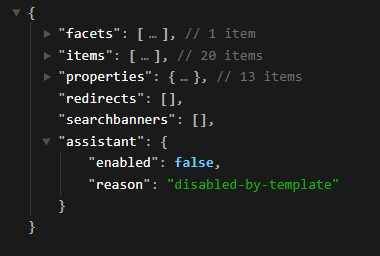
To enable or not to enable, that's the questionThe
navigationresponse contains anassistantobject that indicates whether the AI shopping assistant should be shown or not.
When not enabled, it can have one of the following reasons:
- disabled-by-template: The AI shopping assistant wasn't enabled on the filter template being used.
- quota-reached: The customer has reached or exceeded their credits quota.
- quota-unavailable: The quota could not be retrieved for whatever reason. This could for example be because the Usage Quota API is down or because of a configuration issue.
Error behavior
- A non-2xx response, or a 2xx with invalid JSON, is handled client-side.
- Do not surface the raw error body to the shopper. Show a friendly fallback in the widget; keep the technical detail in logs.
Status Codes
200: Completed search or clarification response.400: Invalid input.403: AI Assistant is disabled for the instance.503: Tweakwise is temporarily unavailable.500: Unexpected internal error.
Cancellation & concurrency
- Pass an
AbortSignalto the request so an in-flight call can be cancelled when the shopper sends a new message. - Handle stale responses: if a newer request has been issued, discard the older response even if it resolves later. Render only the latest.
Examples
Show the assistant in the sidebar or as popup.
Example: chat assistent in sidebar
- Add an assistant entry point to the search sidebar, alongside the existing product filters. Initially show a compact invitation to describe what the user is looking for.
- Expand the assistant when activated, displaying a conversation area, textbox, and Send button directly within the sidebar. Keep the product results visible alongside it.
- Maintain conversation state, including user and assistant messages, the textbox value, loading status, errors, and the history returned by the API.
- Handle prompt submission when the user presses Enter or clicks Send:
- Ignore empty prompts and prevent duplicate submissions while loading.
- Add the prompt to the conversation and clear the textbox.
- Show a loading indicator.
- Execute the AI search request using the same API client and backend proxy as the popup version. Include the conversation messages, previous history, instance key, and relevant search context.
- Process the response:
- Update the conversation with the returned messages.
- Store the returned history for subsequent prompts.
- Update the search page with the returned products, filters, and search information.
- Synchronize the search textbox and URL when the response contains an updated search term.
- Support follow-up prompts so users can refine the results without leaving the search page.
- Allow prompts from other entry points, such as the main search box, to activate the sidebar assistant and immediately submit the selected prompt.
- Provide a way to collapse the conversation, returning to the compact sidebar entry point while preserving the conversation for reopening.
- Handle errors, cancellation, and accessibility with clear feedback, a Stop button, automatic scrolling, and input focus when the assistant opens.
Example: chat assistant in popup
- Create a popup interface with a message history, textbox, send button, and close button. Add a launcher button to open or hide the popup.
- Maintain conversation state, including user and assistant messages, the current textbox value, loading status, errors, and the conversation history returned by the API. Preserve this state when the popup is closed and reopened.
- Handle prompt submission when the user presses Enter or clicks Send:
- Ignore empty prompts and prevent duplicate submissions while a request is running.
- Add the prompt to the conversation and clear the textbox.
- Display a loading indicator.
- Execute the AI search request through the API client. Send the conversation messages, previously returned history, instance key, and relevant search context, such as the root category and current search term.
- Route the request through the backend proxy, which forwards it to the configured conversational commerce API and returns its response to the frontend.
- Process the response:
- Update the displayed conversation with the returned messages.
- Store the returned history for follow-up prompts.
- Pass the returned navigation data to the page to update products, filters, and search information.
- Support follow-up questions by repeating the same request flow with the updated conversation and history.
- Handle loading, errors, and cancellation. Disable Send while loading, show a clear error if the request fails, and optionally provide a Stop button that aborts the request and restores the draft.
- Finish the popup UX with automatic scrolling to new messages, input focus when opened, accessible controls, and a responsive layout.
Example: Handling follow-up prompts
- Keep the conversation state after each successful request, storing both the returned messages and the API-provided history.
- Let the user enter a follow-up prompt in the same textbox, for example:
- Initial prompt: “I’m looking for a cordless drill
- .”Follow-up: “Only show Milwaukee models.”
- Further refinement: “Preferably under €150.”
- Append each new prompt to the existing messages, rather than starting a new conversation.
- Execute another AI search request, sending:
- The existing conversation, including the new user message.
- The history returned by the previous successful request, unchanged.
- The instance key and relevant search context.
- Use the response to update both the conversation and search results. Store the newly returned history for the next follow-up request.
- Keep the conversation active when the assistant is hidden, so reopening the popup or sidebar allows the user to continue.
- Handle failed or cancelled requests without losing the last successful history. Show an error or restore the draft so the user can try again.
- Provide an explicit “New conversation” action if users need to start over. Clear the messages and stored history before submitting a fresh prompt.
Code sample: (using the fake `tweakwiseshop` as instancekey)
- Initial request with the request body:
POST /ai/assistant/tweakwiseshop HTTP/1.1 Host: gateway.tweakwisenavigator.net Content-Type: application/json { "categoryId": "1000001", "messages": [ { "type": "message", "role": "user", "content": "I need a blue summer shirt under 50 euros" } ] } - Assume the assistant responds: “Do you have a preferred brand?”
The follow-up request would use the same domain and headers, but a different bodyPOST /ai/assistant/tweakwiseshop HTTP/1.1 Host: gateway.tweakwisenavigator.net Content-Type: application/json { "categoryId": "1000001", "messages": [ { "type": "message", "role": "user", "content": "I need a blue summer shirt under 50 euros" }, { "type": "message", "role": "assistant", "content": "Do you have a preferred brand?" }, { "type": "message", "role": "user", "content": "Only Tweakwise branded please." } ], "history": {{assistantHistory}} }
Important: Use the actual messages returned by the first request, then append the new user message. The assistant reply above is fictive.
To populate assistantHistory, just pass in the history object from the response of the previous request.
Notes / Important considerations
messagesreplace, not append. Re-render from the response every time; merging leads to a diverging transcript.historyis opaque. Round-trip it as-is. Never construct or edit it. History contains at most eight entries.- Never show the error body to the shopper. Non-2xx and invalid-JSON responses are handled client-side with a friendly fallback.
- Guard against stale responses. Cancel prior requests with an
AbortSignaland ignore any response that isn't for the latest request. navigationis standard. Everything you know about rendering the Search response applies to thenavigationblock.
FAQ
Do I append the returned messages to my existing chat state?
No. The returned messages replace the assistant transcript. Re-render from the response each time instead of concatenating.
What do I do with history?
Treat it as an opaque token. Store the value you receive and send it back on the next request unchanged. Don't parse, edit, or generate it yourself.
How do I stop an old, slow response from overwriting a newer one?
Attach an AbortSignal and abort the previous request before sending a new one, and drop any response that arrives for a request that's no longer the latest.
Updated about 6 hours ago