Implementing the Tweakwise Event Tag is an essential step for us to analyze the performance of your configuration, power our insights reports and support personalization. To support this, we need key e-commerce events on your platform. These are events such as product views, item clicks, add-to-carts, and purchases.
To make full advantage, track:
- session starts
- page impressions
- item clicks
- search phrases
- product views
- add to cart
- add to wishlist
- purchases
For detailed instructions on where and when, see Events & parameters.
Before you begin
Some events require a ProductKey. This is not your shop’s SKU or internal ID, but the item ID as known in Tweakwise.
Before sending events, make sure these match up:
- Learn about RequestId: make sure you're familiar with the concept of request id's. See RequestId.
- Use the correct instancekey: the INSTANCEKEY value for instanceKey must be replaced with your production instancekey.
- Use the correct identifier: the ProductKey must match the item ID in your Tweakwise feed. If it doesn’t, the event won’t link to the right product.
- Check for multi-store setups: in multi-language or multi-store environments, the item key often includes a storeview prefix (for example 1000102345 or 1000202345). Always send the key with the correct prefix for that storeview.
Events
Session start
To be able to connect customer behaviour to session behaviour, send a sessionstart event whenever a new session is started for the specific user.
Note: a session can be considered "new" after 30 minutes of inactivity.
| Property | Required | Type | Value / description |
|---|---|---|---|
| ProfileKey | yes | text | The profile key identifying the visitor. |
| SessionKey | yes | text | The sessionkey for the specific user. This can be your own sessionkey, GA session. As long as it's consistent over the users' session. Allowed characters: alphanumeric and hyphens (hts Tag is j) |
| Source | no | text | The request source |
Reference: /api/sessionstart
curl --request POST \
     --url https://navigator-analytics.tweakwise.com/api/sessionstart?instanceKey=INSTANCEKEY \
     --header 'content-type: text/json' \
     --data '
{
  "ProfileKey": "twfg$ae12deH8631552",
  "SessionKey": "jfAbyWef52319mDfa"
}
'Note: when using Event Tag - Client side this is working out of the box. It might be worth considering just using the client side library to support this event.
Page impression
The pageimpression event is a signal to let us know a lister page, search result, recommendation or guided selling was displayed, to support Click Through Rates in our reporting.
The signal should be sent every time one of the following requests are done and displayed:
- Navigation
- Search
For the future you already can implement the pageImpression for:
- Recommendations
We don't have any reporting for recommendations now but we plan to have that feature in the future.
Notes:
- in case of a cached page the impression should still be pushed!
- if multiple requests are done on one page (e.g. multiple recommendations), fire an impression for each occurance
| Property | Required | Type | Value / description |
|---|---|---|---|
| RequestId | yes | text | The identifier of the linked Tweakwise request (see requestId) |
| SessionKey | yes | text | The sessionkey for the specific user. This can be your own sessionkey, GA session. As long as it's consistent over the users' session. Allowed characters: alphanumeric and hyphens (hts Tag is j) |
Reference: /api/pageimpression
curl --request POST \
     --url https://navigator-analytics.tweakwise.com/api/pageimpression?instanceKey=INSTANCEKEY \
     --header 'content-type: text/json' \
     --data '
{
  "RequestId": "d03c40f5-6894-4e4f-9cd8-95d4efe38eaa",
  "SessionKey": "jfAbyWef52319mDfa"
}
'
Search
To measure the amount of search queries, send a search event when:
- the search results page is displayed
- a redirect is executed after a search
| Property | Required | Type | Value / description |
|---|---|---|---|
| SearchTerm | yes | Text | The search term the visitor used to search for products. |
| ProfileKey | yes | Text | The profile key identifying the visitor. |
| SessionKey | yes | Text | The sessionkey for the specific user. This can be your own sessionkey, GA session. As long as it's consistent over the users' session. Allowed characters: alphanumeric and hyphens (hts Tag is j) |
Reference: /api/search
curl --request POST \
     --url https://navigator-analytics.tweakwise.com/api/search?instanceKey=INSTANCEKEY \
     --header 'content-type: text/json' \
     --data '
{
  "SearchTerm": "jeans",
  "ProfileKey": "twfg$ae12deH8631552",
  "SessionKey": "jfAbyWef52319mDfa"
}
'
Item click / click product
To measure how many times an item is clicked, send a itemClick event whenever a user clicks/taps an item. This should be implemented on search results & lister pages.
| Property | Required | Type | Value / description |
|---|---|---|---|
| RequestId | yes | text | The identifier of the linked Tweakwise request (see requestId ) |
| ItemId | yes | text | The Tweakwise id of the clicked product/item. |
| ProfileKey | yes | Text | The profile key identifying the visitor. |
| SessionKey | yes | text | The sessionkey for the specific user. This can be your own sessionkey, GA session. As long as it's consistent over the users' session. Allowed characters: alphanumeric and hyphens (hts Tag is j) |
Reference: /api/itemclick
curl --request POST \
     --url https://navigator-analytics.tweakwise.com/api/itemclick?instanceKey=INSTANCEKEY \
     --header 'content-type: text/json' \
     --data '
{
  "RequestId": "d03c40f5-6894-4e4f-9cd8-95d4efe38eaa",
  "ItemId": "item123",
  "ProfileKey": "twfg$ae12deH8631552",
  "SessionKey": "jfAbyWef52319mDfa"
}
'
View product
To measure how many times item details are viewed, send a pageview event whenever a user views an item’s details screen.
| Property | Required | Type | Value / description |
|---|---|---|---|
| ProductKey | yes | text | The unique id of the item known at Tweakwise |
| ProfileKey | yes | text | The profile key identifying the visitor. |
| SessionKey | yes | text | The sessionkey for the specific user. This can be your own sessionkey, GA session. As long as it's consistent over the users' session. Allowed characters: alphanumeric and hyphens (hts Tag is j) |
Reference: /api/pageview
curl --request POST \
     --url https://navigator-analytics.tweakwise.com/api/pageview?instanceKey=INSTANCEKEY \
     --header 'content-type: text/json' \
     --data '
{
  "ProductKey": "3129",
  "ProfileKey": "twfg$ae12deH8631552",
  "SessionKey": "jfAbyWef52319mDfa"
}
'
Purchase
The purchase event tracks the transaction of your customers. It is crucial for analyzing the overall performance of algorithm usage, builder, filter templates and more.
| Property | Required | Type | Value / description |
|---|---|---|---|
| ProductKeys | yes | array of text | Array of unique id's of the items (known at Tweakwise) in the transaction |
| Revenue | yes | decimal | The total revenue from the purchase, calculated as the sum of product prices after discounts have been applied and before taxes are added. Can be empty, or must contain a value greater than or equal to 0. |
| ProfileKey | yes | text | The profile key identifying the visitor. |
| SessionKey | yes | Text | The sessionkey for the specific user. This can be your own sessionkey, GA session. As long as it's consistent over the users' session. Allowed characters: alphanumeric and hyphens (hts Tag is j) |
Reference: /api/purchase
curl --request POST \
     --url https://navigator-analytics.tweakwise.com/api/purchase?instanceKey=INSTANCEKEY \
     --header 'content-type: text/json' \
     --data '
{
  "ProductKeys": [
    "3129",
    "6471"
  ],
  "Revenue": 124.50,
  "ProfileKey": "twfg$ae12deH8631552",
  "SessionKey": "jfAbyWef52319mDfa"
}
'
Add to cart
The addtocart event tracks cart additions.
| Property | Required | Type | Value / description |
|---|---|---|---|
| ProductKey | yes | text | The unique id of the item known at Tweakwise |
| Quantity | yes | number | The amount of products |
| TotalAmount | yes | decimal | The total sum (price * amount) from the product added to the cart. |
| ProfileKey | yes | text | The profile key identifying the visitor. |
| SessionKey | yes | text | The sessionkey for the specific user. This can be your own sessionkey, GA session. As long as it's consistent over the users' session. Allowed characters: alphanumeric and hyphens (hts Tag is j) |
Reference: /api/addtocart
curl --request POST \
     --url https://navigator-analytics.tweakwise.com/api/addtocart?instanceKey=INSTANCEKEY \
     --header 'content-type: text/json' \
     --data '
{
  "ProductKey": "3129",
  "Quantity": 1,
  "TotalAmount": 124.50,
  "ProfileKey": "twfg$ae12deH8631552",
  "SessionKey": "jfAbyWef52319mDfa"
}
'
Add to wishlist
The addtowishlist event tracks cart additions.
| Property | Required | Type | Value / description |
|---|---|---|---|
| ProductKey | yes | text | The unique id of the item known at Tweakwise |
| ProfileKey | yes | text | The profile key identifying the visitor. |
| SessionKey | yes | text | The sessionkey for the specific user. This can be your own sessionkey, GA session. As long as it's consistent over the users' session. Allowed characters: alphanumeric and hyphens (hts Tag is j) |
Reference: /api/addtowishlist
curl --request POST \
     --url https://navigator-analytics.tweakwise.com/api/addtowishlist?instanceKey=INSTANCEKEY \
     --header 'content-type: text/json' \
     --data '
{
  "ProductKey": "3129",
  "ProfileKey": "twfg$ae12deH8631552",
  "SessionKey": "jfAbyWef52319mDfa"
}
'
Examples
Google Tag Manager Server Container
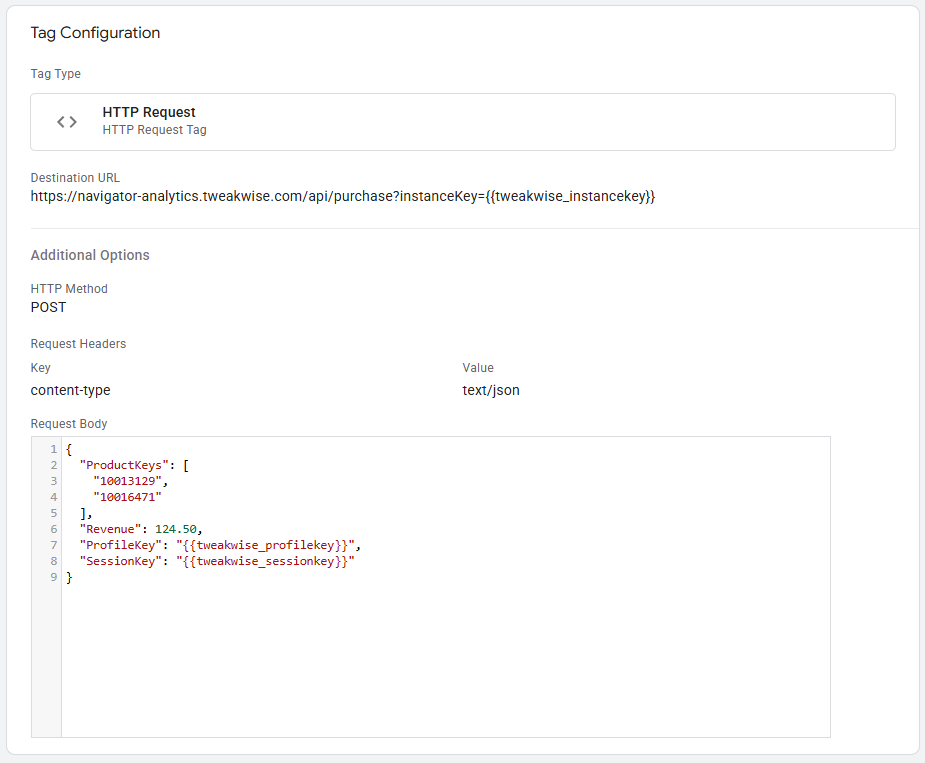
Example: purchase using the HTTP Request Tag Type: