
Shopify Related products - boost sales with smart product recommendations
Tweakwise Recommendations help you increase relevance and average order value with smart, rule-based product suggestions. Upsell, cross-sell and highlight products across your site and emails, without a black box. Stay in control, tweak continuously, and turn product discovery into conversion.
There are two type of recommendations you can add to your web shop:
-
Featured recommendations: helps visitors discover products immediately and set the tone for their shopping experience.
Examples: Best-selling items, New Arrivals, Seasonal promotions or other curated collections.
-
Related recommendations: related recommendations capitalize on customer interest and can significantly increase cart value by suggesting relevant add-ons.
Examples: Complementary items, Similar products, Items frequently bought together or alternatives.
This guide explains how to enable Recommendations on your platform.
Implementation
In the theme's code editor, create a new section tweakwise-recommendations.liquid and copy the following snippet:
<div class="section-{{ section.id }} section section--page-width">
  <div class="page-width tws-recommendations">

    <div class="tws-recommendations__title">
      <h3>{{ section.settings.title }}</h3>
    </div>

    <div class="tws-recommendations__body" id="tweakwise-recommendations" >
      <div class="tw-skeleton__container">
        {% assign count =  8 %}
        {% if section.settings.view == 'carousel' %}
          {% assign count =  4 %}
        {% endif %}
        <div class="tw-skeleton__right is-{{section.settings.view}}">
          {% for i in (1..count) %}
          <div>
            <div class="tw-skeleton is-square"> </div>
            <div class="tw-skeleton is-low"> </div>
          </div>
          {% endfor %}
        </div>
      </div>
    </div>
  </div>
</div>

{%- style -%}
  .tws-recommendations__title {
    padding: 20px;
    text-align: center;
  }
  .tws-recommendations__body{margin: 0 0 40px 0;}
  .tw-skeleton { background: #f2f2f2; margin-bottom: 20px; min-height: 1.5em; }
  .tw-skeleton.is-low { min-height: 1em; }
  .tw-skeleton.is-square { aspect-ratio: 1/1; margin-bottom: 7px; }
  .tw-skeleton.is-square + .tw-skeleton { margin-bottom: 10px; }
  .tw-skeleton__right.is-carousel { display: grid; grid-template-columns: 1fr 1fr 1fr 1fr; gap:10px; }
  .tw-skeleton__right.is-grid { display: grid; grid-template-columns: 1fr 1fr 1fr 1fr; gap:10px; }
{%- endstyle -%}

{%  if section.settings.type != blank %}
<script>
  window.addEventListener("twn.recommendations.ready", function () {
    window.tweakwiseRecommendations({
      output: "#tweakwise-recommendations",
      instancekey: "{{ settings.tweakwise_instancekey }}",
      view: "{{ section.settings.view }}",
{%  if section.settings.type == "related" %}
      related: {
        productId: "{{product.selected_variant.id}}",
        groupKey: "{{ section.settings.groupKey }}"
      }
{% endif %}
{% if section.settings.type == "featured" %}
      featured: {
        id: "{{ section.settings.featuredId }}"
      }
{%  endif %}
    });
  });
</script>
{%  endif %}

{% schema %}
  {
    "name": "Tweakwise Recommendations",
    "settings": [
      {
        "type": "text",
        "id": "title",
        "default": "For you",
        "label": "Title",
      },
      {
        "type": "select",
        "id": "type",
        "default": "featured",
        "options": [
          { "value": "featured", "label": "Featured" },
          { "value": "related", "label": "Related" }
        ],
        "label": "Type"
      },
      {
        "type": "text",
        "id": "groupKey",
        "default": "pdp-cross",
        "label": "Group key",
        "visible_if": "{{ section.settings.type == 'related' }}"
      },
      {
        "type": "text",
        "id": "featuredId",
        "label": "Featured id",
        "visible_if": "{{ section.settings.type == 'featured' }}"
      },
      {
        "type": "select",
        "id": "view",
        "default": "carousel",
        "options": [
          { "value": "carousel", "label": "Carousel" },
          { "value": "grid", "label": "Grid" }
        ],
        "label": "View"
      }
    ],
    "presets": [{
      "name": "Tweakwise Recommendations",
      "category": "Tweakwise"
    }]
  }
{% endschema %}
In the visual editor, a Tweakwise Recommendations section should be available:
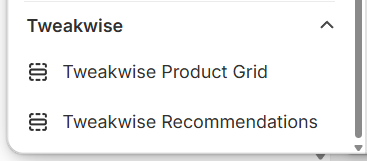
In the visual editor, new sections are available
Using the section
In your theme, go to the Product template.
- Remove/disable any existing
Related ProductsorFeatured Collections. - Add the
Tweakwise Recommendationssection. - In the section settings, select
Relatedand enter the group key configured in Tweakwise.
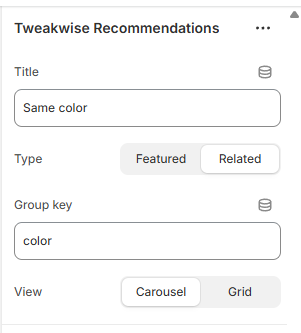
Notes:
- The groupkey can be found in Tweakwise app in the up & cross selling recommendations module.
- The featured products id can be found in the Tweakwise app in the featured products recommendations module.