
Enhancing your webshop's search functionality with dynamic suggestions can greatly improve the user experience. This guide will walk you through the steps to implement this feature, allowing users to see relevant suggestions in real-time as they type in the search bar.
Concepts and usage
The configuration you set up in the app dictates how you should request suggestions from the API.
Read our product guide How do I set up Suggestions? for more details.
In the app, item suggestions can be managed through the the item-type principle so we can support all configured item types (e.g. blog, inspiration, visual, etc.) in the suggestions endpoint.
That means suggestions may return non-product items, for example a blog post. Each suggested item will include the type field allowing the frontend to distinguish and render products vs content-items appropriately.
Implementation
For item suggestions, send a request to /suggestions/items or /suggestions/items/grouped:
The response will contain one or more blocks of different type of suggestions:
{
    "blocks": [
        {
            "name": "Products",
            "items": [
                {
                    "type": "product",
                    "itemno": "10001123",
                    "title": "Tweakwise Polo Blue",
                    /* omitted for brevity */
                }
            ],
            "nrofitems": 1
        },
				{
            "name": "Blogs",
            "items": [
                {
                    "type": "blog",
                    "itemno": "K23123",
                    "title": "Tweakwise Feature Launch – November 2025",
                    /* omitted for brevity */
                }
            ],
            "nrofitems": 1
        }
    ]
}
The items can be displayed as desired. By using the type property the display can be different per content type. If more information is required, the data can be enriched from your platform, using the itemno: this is the item identifier known by Tweakwise.
Example
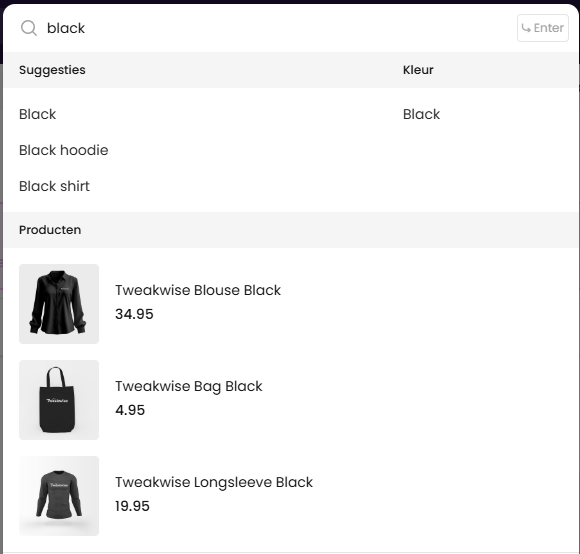
Typing black would result in these requests + responses:
[
    {
        "name": "Suggesties",
        "type": "SearchPhrase",
        "suggestions": [
            {
                "match": "Black",
                "navigationLink": {
                    "context": {
                        "searchterm": "Black"
                    }
                },
                "redirects": []
            },
            {
                "match": "Black hoodie",
                "navigationLink": {
                    "context": {
                        "searchterm": "Black hoodie"
                    }
                },
                "redirects": []
            },
            {
                "match": "Black shirt",
                "navigationLink": {
                    "context": {
                        "searchterm": "Black shirt"
                    }
                },
                "redirects": []
            }
        ]
    },
    {
        "name": "Kleur",
        "type": "FacetFilter",
        "suggestions": [
            {
                "match": "Black",
                "navigationLink": {
                    "context": {
                        "category": {
                            "path": "1000",
                            "link": null
                        },
                        "facetFilters": [
                            {
                                "key": "color",
                                "values": [
                                    "Black"
                                ]
                            }
                        ]
                    }
                }
            }
        ]
    }
]{
"blocks": [
{
"name": "Producten",
"items": [
{
"type": "product",
"itemno": "10001174",
"title": "Tweakwise Blouse Black",
"price": "34.95",
"brand": "Tweakwise",
"image": "/tw-blouse-black.png",
"url": null,
"attributes": []
},
{
"type": "product",
"itemno": "10001136",
"title": "Tweakwise Bag Black",
"price": "4.95",
"brand": "Tweakwise",
"image": "/products/tas-zwart.jpg",
"url": null,
"attributes": []
},
{
"type": "product",
"itemno": "10001130",
"title": "Tweakwise Longsleeve Black",
"price": "19.95",
"brand": "Tweakwise",
"image": "/products/sleeve-zwart.jpg",
"url": null,
"attributes": []
}
],
"nrofitems": 12
}
]
}That can be displayed in the desired way, order and even possible layouts:
Notes & recommendations
- Suggestions do not inherit configurations: if you target a suggestion for a specific category, we will not fall back on a parent category configuration.
- It is recommended to set up one configuration that works for your entire instance, or at least as few as possible configurations that work for most situations.
- Apply request Throttling / debounce input events to prevent unnecessary requests.
- Cancel running requests: if the user is typing, make sure you only display the latest request.
- Language support: make sure to specify the language code, see Language Support.