
Commerce Pages helps e-commerce teams turn category pages into scalable conversion drivers. Using the Merchandising Builder, smart sorting and adaptive filters, teams control how products are discovered and presented. As merchandising maturity grows, layouts and experiences can be enriched to further improve relevance and conversion.
Tweakwise JS can take over entire pages in your platform and show a Tweakwise product lister page instead.
Installation
Make sure you have followed the Installation guide.
Implementation
Enabling the product lister page is as similar to initializing the search results:
<script>
  window.addEventListener('twn.starter.ready', function () {

    const listerPage = tweakwiseListerPage({
      cid: "CID",
      output: "#tweakwise-output"
    });

  });
</script>
<script>
window['twn-starter-config'] = window['twn-starter-config'] || {};
window['twn-starter-config'].navigation = window['twn-starter-config'].navigation || {};
window['twn-starter-config'].navigation.output = "#tweakwise-output";
window['twn-starter-config'].navigation.cid = "CID";
</script>Notes:
- Replace
CIDwith the ID of the category you want to show.
This ID should be known in Tweakwise, as provided through the feed or Backend API. - Replace
outputwith the container you want to target - Make sure auto-initializaton is off. Go to Plugin Studio Search & Merchandising settings.
In the Advanced tab, check the Auto-initialization section. The toggle should be set to off
Options & events
Go to Search & Commerce Pages Options and Events.
Languages
Go to Search & Commerce Pages Language support.
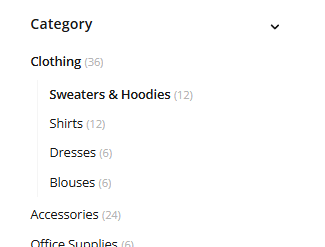
Category Tree support
To support the category tree in Tweakwise JS, when providing the cid, make sure you provide the full path so we know what tree we need to display:
tweakwiseListerPage({
  cid: "1000-1001-1004"
});
<script>
window['twn-starter-config'].navigation.cid = "1000-1001-1004";
</script>This would result in selection of category 1004, while displaying the entire tree:
Landing Page support
Go to landing pages.