In Tweakwise it is possible to set up recommendations based on rules. However in some cases recommendations need to be imported from your existing platform, ERP, or PIM system and then enhanced with Tweakwise features.
Configuring the feed
We recommend using an attribute for each product that shows the related product identifiers from your existing system. This can be done via an external property or it can be added to your regular feed. In the example down below we have added an attribute called Related Products, the values should be the product identifiers you want to see as recommendations.
<item>
  <id>10001-284703823</id>
  <name>My Product with imported recommendations</name>
  ...
  <attributes>
    <attribute>
      <name>Product ID</name>
      <value>98765</value>
    </attribute>
    <attribute>
      <name>Related Products</name>
      <value>12345</value>
    </attribute>
    <attribute>
      <name>Related Products</name>
      <value>67890</value>
    </attribute>
    ...
  </attributes>
  ...
</item>
Multiple valuesAs visible in our example you can add multiple values for a single attribute by adding the attribute multiple times with a different value.
Configuring your recommendation
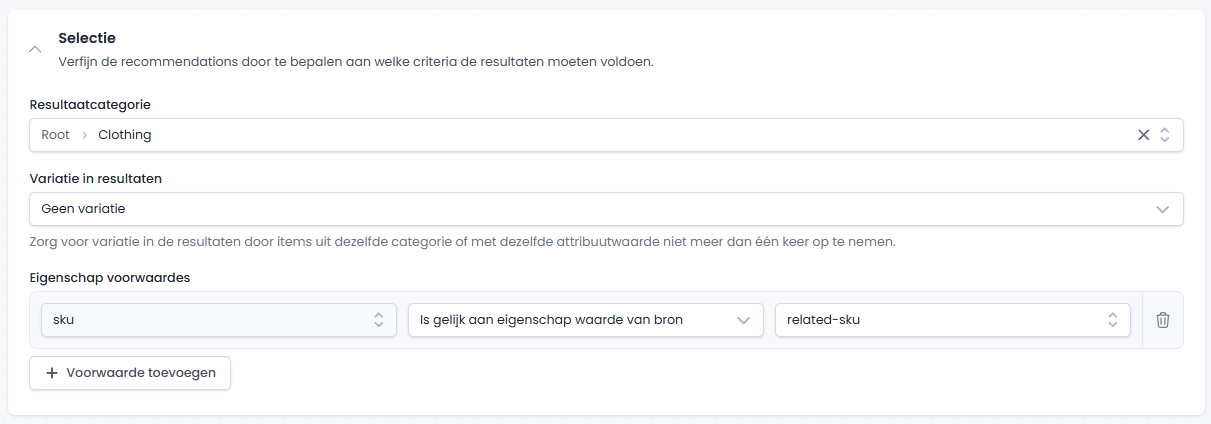
Using the feed based on the example above you can configure your recommendation to match the Product ID property of the related products with the Related Products property of the source product. You can then extend this with Tweakwise features like rule-based relevancy sorting and the recommendation builder: