
This event marks the beginning of a visitor session on your website.
Automatically submitted when using client side implementationWhen using the client side implementation, this event is automatically submitted when the base script is included. You won't need any additional configuration for this event.
How to implement?
// No need to implement this. It's already included in the base tagcurl --request POST \
--url https://navigator-analytics.tweakwise.com/api/sessionstart?instanceKey=INSTANCE_KEY \
--header 'content-type: application/json' \
--data '
{
"ProfileKey": "PROFILE_KEY",
"SessionKey": "SESSION_KEY",
"Source": "SOURCE"
}
'Parameters
| Name | Type | Required | Description |
|---|---|---|---|
| INSTANCE_KEY | URL-parameter - text | yes | Your Tweakwise Instance Key |
PROFILE_KEY | Body parameter - text | yes | The ID that identifies the current visitor. Read more about the profile key here |
SESSION_KEY | Body parameter - text | yes | The session key for the specific user. This can be your own session key, GA session. As long as it's consistent over the user's session. Allowed characters: alphanumeric and hyphens |
| SOURCE | Body parameter - text | no | The request source. More information about this can be found here |
When do I submit this event?
Submit this event once when a visitor starts their session on your website.
Where do I implement this event in the code?
A customer can enter (and therefore start their session on) your website on any page. Make sure this event is submitted just once per session!
How to handle event specific warnings from Tweakwise
Mismatched profilekeys in Delivery API and SessionStart (xx%)
Description
In more than 5% of cases, the ProfileKeys in the Delivery API do not match the ProfileKeys in the SessionStart event.
Possible solution
Review how the profile/user ID is passed to the Tweakwise Delivery API requests and compare it to the values sent during SessionStart event creation.
100% missing?If the message states that there's a mismatch of 100%, chances are that the profile key is not passed to the regular calls to the delivery API (for search, category and other product related requests) at all.
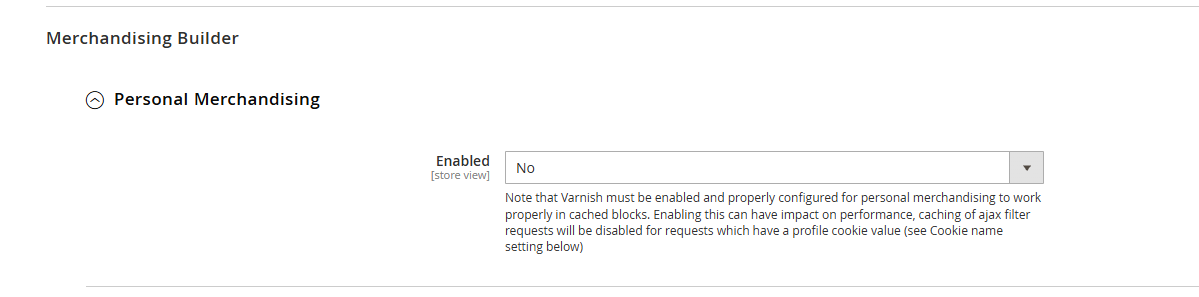
In Magento this can be the result of having not having the setting "Personal Merchandising" enabled. Please note that prior to enabling this setting that Varnish cache should be fully configured in order to have affect.
Warning: Enabling this setting can influence the performance on affected pages, depending on your page configuration.
Please share your findings with your implementation partner. If they have questions about these messages, please let them contact [email protected]
FAQ
Why don't I have to implement this when using the client side script?
The base script for the server side already tracks your session and therefore can submit the session start for you.