
Tweakwise Personalization transforms real-time visitor behavior into hyper-relevant product feeds. With dynamic sorting, in-session profiles, and full control over all settings, you create a personal shopping journey that increases conversion. Smarter, more intuitive, and always ready to be tweaked to match your business goals.
Instruction & Implementation
Step 1: Verify Event Tag implementation & Profilekey usage
Personalization relies entirely on user behavioral data. Before configuring the test, you must ensure your application is successfully sending event data to Tweakwise.
- Check if all event tag events are sent correctly.
- Verify that the customer profilekey is consistent across all events and API requests.
Without this, Tweakwise will have nothing to act on.
Step 2: Configure a Personalized Builder
Open (or create) a builder and add a last viewed component on position 2.
Step 3: Verify it works
After publication, open the demoshop.
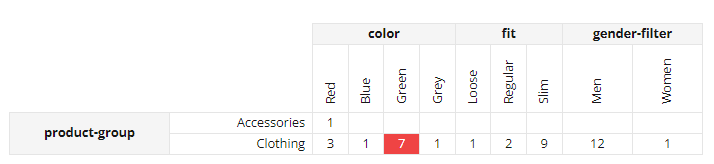
Click around, build up a profile and check the Personalization profile matrix to see if a we have a definite winner segment (marked red).
The product on position 2 should be marked with a Last viewed badge:
Notes & Important Considerations
- Profilekeys & Sticky Sessions: Tweakwise handles the user distribution (bucketing) automatically based on the
profilekeyprovided in the API requests. Ensure your application passes this key consistently on every request. - A/B Testing: Instead of guessing, consider adding personalization in an A/B test. By using a data-first approach, you can prove that personalization works.
FAQ
How do I know if the event tags are working?
You can verify this in the Tweakwise App dashboard. If all checkmarks are green: you're good to go. If you just implemented the Event Tag today, wait a day to see if data is flowing in.
What happens if a new user visits the site (no history)?
If a user lands on a page for the first time, our algorithms will fallback to the organic product for that result. This ensures the user never sees an empty or broken page.